<div>codingEverybody</div>
div {
    font-size: 2em;
    font-weight: 900;
    text-align: center;
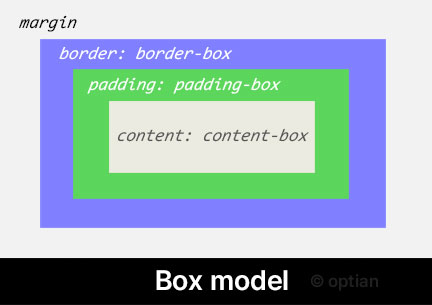
    border: 10px dashed red;  /* borderの外側の縁までの領域がborder-box */
    padding: 30px; /* paddingの外側の縁までの領域がpadding-box
                     paddingの内側の領域がcontent-box */
    background-image: url("flower.jpg");
    background-position: center;
    background-clip: border-box; /* 初期値 */
}
デモを適用してみる:background-clip デモボタンをクリックしてみてください!
background-clip: border-box | padding-box | content-box | text
要素ボックスの Box model
要素ボックスの Box model
/* キーワード値 */
background-clip: border-box;
background-clip: padding-box;
background-clip: content-box;
background-clip: text;

/* グローバル値 */
background-clip: inherit;
background-clip: initial;
background-clip: revert;
background-clip: revert-layer;
background-clip: unset;
/*
    2024年より前のWebkitベースのブラウザでは
    background-clip: textはサポートされていませんでした。
    ベンダープレフィックスである「-webkit-」を含めて使用する必要がありました。
*/
-webkit-background-clip: text;

/* 2024年からはほとんどのブラウザで
    「-webkit-」なしでtext値をサポートしています。
*/
background-clip: text;
selector {
    background-clip: text;
    /* テキストの背景が見えるようにするには、
       テキストの色は透明(transparent)である必要があります。 */
    color: transparent;
}
<div>TEXT</div>
div {
    font-size: 50px;
    font-weight: 900;
    background-clip: text;
    color: transparent;
    background-image: linear-gradient(red, blue);
}
実際に適用された様子

caniuse.comで詳しい情報をご確認ください。